Raise A Champion codes: rewards and how to redeem
Find Raise A Champion code rewards, check redemption requirements, and use the MENU and SETTINGS screens to claim them.
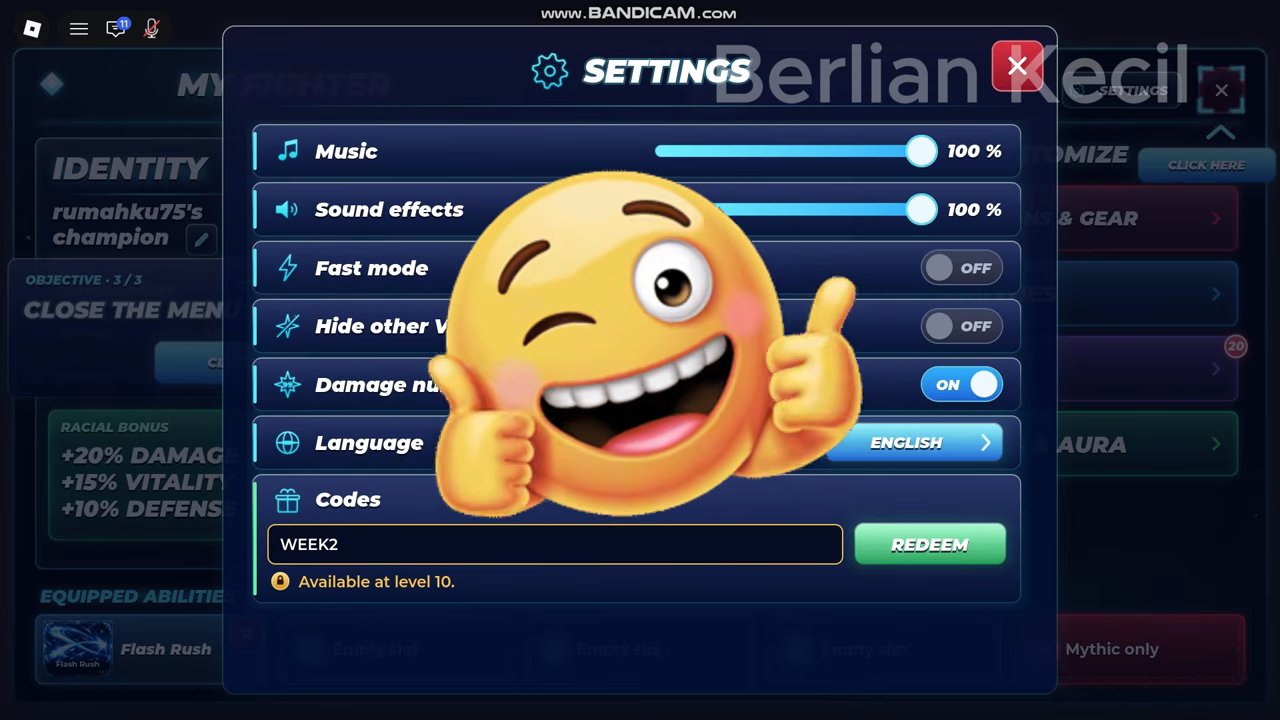
Use the tables below to check Raise A Champion code rewards and requirements. Finish the tutorial, then open MENU → SETTINGS → Codes to enter a code. If a code is rejected, check its spelling and requirements before trying again.
Codes, rewards and requirements
Working codes
THANKSFOR95Source checked:
Complete the tutorial
WEEK2Source checked:
Complete the tutorial and reach champion level 10
UPD1Source checked:
Complete the tutorial
| Code (click to copy) | Rewards | Status | Source checked | Conditions |
|---|---|---|---|---|
THANKSFOR95 | 1 Ultra Lucky Spin3 Trait Rolls | Reported active | Complete the tutorial | |
WEEK2 | 3 Trait Rolls | Reported active | Complete the tutorial and reach champion level 10 | |
UPD1 | 3 Lucky Spins | Reported active | Complete the tutorial |
Code list at a glance
“Reported” means a code is listed by a source; “Tested” means an in-game redemption check is recorded. The source-check date is not an expiry date or a guarantee that a code will still work when you enter it.
How to redeem codes in the game menu
- Launch Raise A Champion on Roblox and finish the short tutorial.
- Select the MENU icon on the left side of the screen.
- Open the SETTINGS tab in the upper-right corner.
- Find the Codes section at the bottom of the settings window.
- Paste one code into the Enter a code text box.
- Select REDEEM to submit it.
Enter each code separately. A “successfully entered” confirmation indicates that the game accepted the code. Copying the exact string helps preserve its capitalization and numbers, and avoids mistakes while entering it.
What to check if a code fails
A rejected code does not automatically mean it has expired. Start by copying it again from the table and removing any spaces before or after the code. Keep every letter and number intact rather than changing the spelling to try to make it work.
For WEEK2, check your champion’s level before trying again. Its level 10 requirement is an eligibility gate: reaching the code box after the tutorial does not mean your champion can redeem every code. If the game displays the level requirement message, reach level 10 before submitting WEEK2 again. The leveling guide covers that separate progression task.
If you cannot find the redemption field, finish the tutorial first, then return to the bottom of the settings window. Once your entry and requirements are correct, expiration remains a possible reason for rejection. Redeem eligible codes promptly instead of saving them for a later session.
What the rewards are for
Use the reward labels in the table to decide which build resources you want. Spins are used for your champion’s Race and Abilities; Trait Rolls are a separate resource for trait rerolls.
Keep the reward labels distinct when reading the table: Ultra Lucky Spins, Lucky Spins and Trait Rolls are listed separately. For more about the systems behind those rewards, see the races guide, abilities guide and trait rerolls guide.
Where to find new codes
Check the Raise A Champion community hub for the Discord invite and creator links. Watch for any redemption requirements attached to a new code as well as the code itself; WEEK2 shows why a valid code may still be unavailable to a lower-level champion.
Expired codes
Expired codes
No codes are currently listed as expired.
Code sources
Code sources
Reported means a source lists the code. Tested means an in-game redemption check is recorded. Check dates do not indicate when a code expires.
- Pro Game Guides
THANKSFOR95· Source checked:WEEK2· Source checked:UPD1· Source checked:
- Destructoid
THANKSFOR95· Source checked:WEEK2· Source checked:UPD1· Source checked:
- GAMES.GG
THANKSFOR95· Source checked:WEEK2· Source checked:UPD1· Source checked:
- Raise a Champion Codes (November 2026) - Free Rewards
THANKSFOR95· Source checked:WEEK2· Source checked:UPD1· Source checked:
Related Guides
Beginner Guide
Follow the tutorial arrow, collect the free starter glove, take the quest and begin your first Chapter 1 stages.
Spins vs. Trait Rolls
Match your intended build change to Spins or Trait Rolls, and understand why equipment follows a separate purchase route.
Lucky & Ultra Lucky Spins
Distinguish the two lucky-spin reward names, find their code examples, and check the prerequisites before trying to claim them.